
Best DAWs for Home Studios in 2026
(With Setup Tips)
The DAW market reached $4 billion in global revenue in 2026, growing at a 9% annual rate driven almost entirely by independent home studio creators (Mordor Intelligence, 2026). That growth means more choices, more marketing noise, and more people picking the wrong tool because a YouTube video told them to. Ableton isn’t the right DAW for everyone. Neither is Logic. The “best DAW” depends almost entirely on how you work and what you make.
This guide cuts through that noise. Instead of ranking DAWs in a vacuum, we match each one to a specific type of home studio creator, from the first-time hobbyist to the intermediate producer switching workflows. You’ll get a concrete recommendation, a pricing breakdown, and a setup checklist for each persona so you can be making music on day one, not watching tutorials on day seven.
Key Takeaways
- The top three DAWs (Ableton, FL Studio, Logic Pro) jointly hold about 58% of global user share, but none is the universal best choice (Market Growth Reports, 2026).
- Beginners on Mac can start for free with GarageBand; Windows beginners should start with the free version of Reaper or FL Studio’s trial before committing.
- FL Studio’s lifetime free updates policy makes it the highest long-term value for budget-conscious producers. You pay once, you get every future version forever.
- Vocalists and singer-songwriters get the best built-in tools from Logic Pro: Flex Pitch, Swipe Comping, and Channel Strips outperform rivals at the $199 price point.
- Your DAW choice matters less than your room acoustics and interface quality. A treated room with a $99 interface beats an untreated room with a $500 one, every time.
What Makes a DAW “Right” for a Home Studio?
A functional beginner home studio setup costs between $400 and $800, covering an audio interface, microphone, headphones, and DAW (Audeobox / legitloaded.com, 2026). Your DAW is often the smallest part of that budget, especially since several excellent options are free or nearly free. The question isn’t “which DAW is best” but “which DAW fits how your brain works.”
Three factors determine DAW fit: your workflow preference (pattern-based vs. linear timeline), your genre (beat-oriented vs. live-recorded vs. voice-focused), and your platform (Mac vs. Windows). Get those three right and you’ll rarely need to switch.
The Two DAW Workflow Models
Before we get to specific recommendations, you need to understand the two fundamental workflow models every DAW falls into:
Linear / Arrange-first: You see a traditional timeline from left to right. You record audio or MIDI into that timeline in real time. Logic Pro, Pro Tools, Cubase, Studio One, and Reaper all work this way. It’s intuitive for anyone who’s ever used a tape recorder or edited video. Singer-songwriters, podcasters, and multi-instrumentalists thrive here.
Pattern / Loop-first: You build beats and loops in isolated cells or patterns, then arrange them into a song. FL Studio and Ableton Live (in Session View) work this way. It matches how hip-hop, trap, and EDM producers actually think. If you build 8-bar loops before thinking about song structure, this is your model.
Choosing a workflow that fights your natural instincts is the main reason people abandon DAWs after two weeks. Pick the model first, then pick the DAW. If you are still unsure which fits you, our guide to choosing the right DAW walks through the decision in more depth.
The Bedroom Beginner: Start Here, Stay Here Longer Than You Think
Most beginners overbuy. They spend $200 on a DAW before they’ve figured out what a bus is. The honest advice: start free, stay free until you’re running into hard walls. For Mac users, GarageBand is already installed on your computer. For Windows users, the free tier of Reaper or FL Studio’s unlimited free trial cover everything you need for the first six months.
GarageBand
GarageBand comes free with every Mac and iPad, and it’s a stripped-down version of Logic Pro that shares the same audio engine. That matters: if you outgrow it and upgrade to Logic Pro ($199), your projects import without any conversion. It handles multitrack recording, basic mixing, a large Apple Loops library, and software instruments with no setup required.
For podcasters and beginners recording vocals and acoustic instruments, GarageBand’s Channel Strip system applies EQ, compression, and reverb presets with a single click. That’s a meaningful time-saver when you’re still learning what EQ does.
- Best for: First Mac owners, podcast starters, acoustic songwriters on a budget
- Limitation: No third-party VST plugins (AU only), Mac/iOS exclusive, limited mixing depth
- Upgrade path: Logic Pro, same interface, same engine, vastly more power
GarageBand First-Session Setup (5 steps)
- Open GarageBand, choose Empty Project (not “Voice”, that adds unwanted effects to your signal).
- Go to Preferences > Audio/MIDI and set your interface or USB mic as both Input and Output device.
- Create an Audio track, select Mono input (not Stereo) for single-microphone recording.
- Disable the Metronome if you’re recording spoken word or podcast content; keep it on for music.
- Set your recording level so the meter peaks in the yellow zone during normal speaking or playing, never red.
Windows beginners: download Reaper (reaper.fm). It has a 60-day fully functional trial with no features locked, and a discounted license is only $60 after that. It’s not as polished as GarageBand but it’s cross-platform, extremely lightweight, and supports every plugin format. For a full overview of your no-cost options, check our free DAWs for beginners guide.
The Aspiring Beatmaker: Pattern Workflow Is Everything
FL Studio’s piano roll is, by wide consensus among producers, the best MIDI editing interface in any DAW (Born To Produce, 2026). It’s precise, fast, and built for exactly how beatmakers think: in patterns and loops rather than linear timelines. Ableton Live’s Session View is the other primary choice, better suited for experimental and performance-oriented electronic production. For a detailed breakdown of how these two compare, see our FL Studio vs Ableton guide.
FL Studio
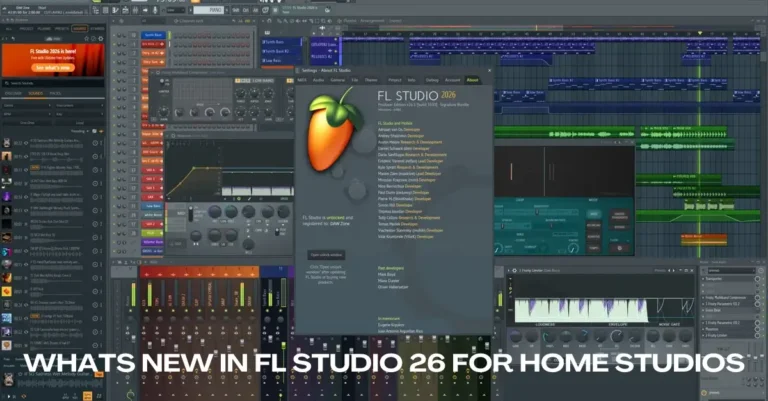
FL Studio’s lifetime free updates policy is the biggest differentiator in the DAW market. You buy Producer Edition once for $199, and every future version, including FL Studio 30, whenever that ships, is included. The 2026 version added collaborative cloud sessions and a redesigned mixer. No other major DAW offers this.
The workflow is pattern-based: you build beats in the Step Sequencer, develop melodies in the Piano Roll, then arrange them in the Playlist. FL Pitcher handles pitch correction natively, removing the need to buy Auto-Tune separately. The stock plugin suite, including Sytrus, Harmor, and Gross Beat, is strong enough that many producers never need third-party instruments.
- Best for: Hip-hop, trap, EDM, and electronic producers; anyone who builds beats before thinking about song structure
- Limitation: Audio recording workflow is less polished than Logic or Ableton; the Playlist can feel cluttered for vocal-heavy sessions
- Sweet spot edition: Producer Edition ($199), includes audio recording and all core instruments
Ableton Live 12
Ableton’s Session View is the only clip-launching interface in a mainstream DAW, making it unmatched for live electronic performance and experimental production. Live 12 (2026) introduced real-time stem separation, deeper MPE support, and an expanded Max for Live library. Its Warp engine, for time-stretching audio, remains the best in any DAW.
No built-in pitch correction is the notable gap: you’ll need to budget for Antares Auto-Tune or Waves Tune. For beatmakers who also perform live or want to do unusual things with audio, Ableton is the professional choice.
- Best for: Live performers, experimental electronic producers, DJs who produce
- Limitation: Expensive at the Suite tier ($749); no built-in pitch correction
- Entry point: Intro version ($99) covers the basics; upgrade when you hit its limits
The Singer-Songwriter: You Need Comping, Not Clip Launching
Singer-songwriters have different needs than beatmakers. You’re recording multiple takes of the same vocal line, comping the best phrases together, applying pitch correction to specific notes, and building arrangements around live-recorded instruments. Logic Pro handles all of this better than any other DAW at its price point, and it’s not particularly close.
Logic Pro
Logic Pro’s Swipe Comping is the best vocal comping system in any DAW. You record multiple takes, then swipe across the sections you want to keep from each take, Logic stitches them together seamlessly. Flex Pitch lets you adjust the pitch of individual syllables by dragging them, without loading a separate plugin. The built-in Channel Strips apply professional vocal processing chains in one click.
The 2025/2026 updates added AI-assisted mastering tools and expanded Dolby Atmos support, positioning Logic as a serious post-production tool beyond just songwriting. At $199 as a one-time purchase (with a 90-day free trial), it’s remarkable value. The only hard constraint: it’s Mac-only.
- Best for: Vocalists, acoustic instrument recording, singer-songwriters on Mac
- Limitation: Mac only; can feel overwhelming with its feature depth initially
- Upgrade path from GarageBand: Direct project import, same interface philosophy
On Windows? Use Cubase or Studio One
Cubase 15 (released November 2025) is Logic’s closest Windows equivalent: deep MIDI composition, VariAudio for pitch editing comparable to Flex Pitch, and an excellent MixConsole. Studio One 7 (PreSonus) is a strong alternative with a cleaner interface and a free Artist tier that covers recording basics without time limits. If you are choosing between the two on Mac, our Studio One vs Logic Pro comparison covers the key differences.
Singer-Songwriter First Session: Recording Vocals Cleanly
- Set your audio interface gain so peaks hit around -18 to -12 dBFS during performance, not -6 dBFS, which leaves no headroom for loud moments.
- Enable Software Monitoring in your DAW settings, not Direct Monitoring, if you want to hear reverb on your voice while recording.
- Record at least 3 takes of every vocal line before comping, your third take is almost always better than your first.
- Use Logic’s Quick Swipe Comping: record takes, press C to enable comping, and drag across the best sections of each take.
- Add a high-pass filter (cut everything below 80-100 Hz) before any other processing on vocal tracks to remove room rumble.
The DAW-Switcher: Workflow Efficiency Over Feature Count
If you’re switching DAWs, you’re almost certainly moving for one of three reasons: your current DAW is sluggish on your hardware, the MIDI editing feels limiting, or your genre has evolved past what your original tool handles well. Resist the urge to switch based on YouTube recommendations alone. Most DAWs reach professional results, the difference is workflow speed, not output quality.
Common Switch Scenarios and the Right Move
| Current DAW | Pain Point | Recommended Switch | Why |
|---|---|---|---|
| GarageBand | Need VST plugins / more tracks | Logic Pro | Direct project import, same interface |
| FL Studio | Recording live band / heavy audio | Cubase or Studio One | Superior linear audio recording workflow |
| Ableton | Want better MIDI composition tools | Cubase 15 | Best chord track and score editor |
| Pro Tools | Cost / subscription fatigue | Reaper or Studio One | One-time purchase, similar linear workflow |
| Logic Pro | Moving to Windows PC | Studio One or Cubase | Closest workflow equivalents on Windows |
The Home-Office Podcaster: You Don’t Need a Music DAW
Podcasters and voice-over creators don’t need a music production DAW. Most music DAWs are designed around beats per minute, MIDI instruments, and sample libraries, none of which matter when you’re editing spoken word. The features you actually need are: multitrack recording, noise reduction, easy cut-and-splice editing, and export to MP3 or WAV at loudness-normalized levels.
Best DAW Options for Podcasters
GarageBand (Mac) / Audacity (Windows)
GarageBand’s multitrack interface handles podcast recording well once you ignore its music-production features. Audacity is the Windows equivalent: free, open-source, and capable of multitrack recording, noise reduction, and direct MP3 export. Neither is built specifically for podcasting, but both are sufficient for shows under 10 episodes per month.
- GarageBand podcast setup: Always choose Empty Project, not a music template. Disable the metronome. Switch the timeline display from Bars to Time.
- Audacity tip: Use Effect > Noise Reduction: record 2 seconds of silent room tone, select it, then apply the profile to the whole track. It removes consistent background hum cleanly.
Adobe Audition / Reaper
Adobe Audition ($20/month) is built around spoken word. Its Multitrack Session view handles podcast post-production cleanly: one track per speaker, music beds on separate tracks, automated loudness normalization to -16 LUFS (the Spotify Podcasts standard). The Essential Sound panel applies voice processing presets in one click, much faster than building a chain manually.
Reaper ($60 discounted license) is the better value for podcasters who don’t want a subscription. Its routing is flexible enough to handle multi-host remote sessions, and its startup time and CPU load are lower than most full DAWs.
Podcast Recording Setup Checklist
- Record mono (not stereo), single-channel voice files are smaller and easier to edit.
- Set recording levels to peak around -12 dBFS average. Never let levels clip (hit 0 dBFS).
- Record 10 seconds of “room tone” (silence in your recording space) at the start of each session, you’ll use this for noise reduction profiles.
- Use a dynamic microphone (not condenser) if your room isn’t acoustically treated, dynamics are less sensitive to room reflections.
- Export final episodes at -16 LUFS for Spotify, -14 LUFS for Apple Podcasts. Both Audition and Reaper have LUFS meters built in.
The Budget-Conscious Engineer: Maximum Value Per Dollar
The best value proposition in the DAW market is FL Studio’s lifetime free updates model. You pay once, $199 for Producer Edition, and receive every future version forever. Competitors charge $99-$299 for major version upgrades. Over five years, FL Studio’s total cost of ownership is typically 40-60% lower than subscription-based or upgrade-priced alternatives.
| DAW | Entry Price | 5-Year Cost (Est.) | Platform | Free Trial |
|---|---|---|---|---|
| GarageBand | Free | Free | Mac only | ✓ Permanent |
| Reaper | $60 | ~$120 | Mac + Windows | ✓ 60 days |
| FL Studio Producer | $199 | $199 (lifetime updates) | Mac + Windows | ✓ Unlimited trial |
| Logic Pro | $199 | ~$199-$299 | Mac only | ● 90 days |
| Ableton Live Intro | $99 | ~$300-$400 | Mac + Windows | ✓ 30 days |
| Ableton Live Suite | $749 | ~$900+ | Mac + Windows | ✓ 30 days |
| Pro Tools Artist | $99/year | ~$495 | Mac + Windows | ✓ 30 days |
| Cubase Elements | $99 | ~$200-$300 | Mac + Windows | ✓ 60 days |
For Windows users, Reaper at $60 is genuinely competitive with any paid DAW at 10x the price. Its plugin compatibility (VST, VST3, AU, JSFX), low CPU footprint, and deep customization make it a serious tool used by professional sound designers and film composers, not just budget producers.
The DIY Multi-Instrumentalist: Recording a Full Band in Your Bedroom
Recording a full band at home, guitars, bass, drums, vocals, is a different challenge than producing beats or recording vocals. You need low-latency monitoring, reliable multi-channel recording, a good comping workflow, and ideally built-in amp simulation for DI-recorded guitars. This is where Cubase, Studio One, and Logic pull ahead of FL Studio and Ableton.
Cubase 15
Cubase 15 (November 2025) is a complete recording and mixing environment. VariAudio handles pitch correction on recorded vocals and instruments with pitch-graph editing comparable to Melodyne. The MixConsole is among the most powerful mixers built into any DAW, channel strip, group channels, VCA faders, and direct routing all work as you’d expect from a professional setup.
For guitarists recording DI (direct input), Cubase’s AmpSimulator plugin handles basic amp tones without purchasing Neural DSP or similar. It’s not the most impressive amp sim available, but it’s solid enough for demo recordings and scratch tracks.
- Best for: Rock, metal, singer-songwriters on Windows, anyone tracking live instruments
- Limitation: Steeper learning curve than Logic or Studio One; more expensive at Pro tier
- Alternative: Studio One 7 (PreSonus), cleaner UI, strong audio recording, free Artist tier
Multi-Instrument Home Recording: Tracking Order That Actually Works
- Drums first (or a drum grid/programmed reference): everything else locks to the groove. Even a simple MIDI drum template helps keep takes tight.
- Bass second, locked to the kick drum. Record DI and add amp simulation after, you’ll have more flexibility in the mix.
- Rhythm guitars third, double-tracked left and right at -100% and +100% pan for width.
- Vocals and leads last, once the rhythm section is locked, melodic parts record more comfortably.
- Set buffer size to 128 samples or lower during recording for minimal latency. Increase to 512+ during mixing to reduce CPU load.
Full DAW Comparison: Features by Persona
| DAW | Beginner | Beatmaker | Vocalist | Podcaster | Band | Budget |
|---|---|---|---|---|---|---|
| GarageBand | ✓✓ | ● | ✓ | ✓ | ● | ✓✓ |
| FL Studio | ● | ✓✓ | ● | ✗ | ● | ✓✓ |
| Ableton Live | ✗ | ✓✓ | ● | ✗ | ● | ● |
| Logic Pro | ✓ | ● | ✓✓ | ✓ | ✓ | ✓ |
| Cubase 15 | ✗ | ● | ✓ | ● | ✓✓ | ● |
| Studio One 7 | ● | ● | ✓ | ✓ | ✓ | ✓ |
| Reaper | ✗ | ● | ✓ | ✓ | ✓ | ✓✓ |
✓✓ = Strong fit ● = Workable ✗ = Not recommended for this use case
Universal Home Studio Setup Tips That Apply to Every DAW
Your DAW choice matters less than most gear decisions you’ll make for your home studio. Room acoustics and interface quality have a far larger impact on recording quality than which DAW you’re running. A treated room with a $99 audio interface outperforms an untreated room with a $500 one (legitloaded.com, 2026). These tips apply regardless of which software you choose.
1. Treat the room before you spend on gear
Hard, parallel walls create standing waves and flutter echo. You don’t need expensive acoustic panels. Thick curtains on bare walls, rugs on bare floors, and bookshelves filled with irregularly-sized objects all absorb and diffuse reflections. Bass traps in room corners address low-frequency buildup, the hardest acoustic problem to solve and the most damaging to your mixes.
2. Set your buffer size right
Buffer size determines monitoring latency. During recording: set it as low as your interface handles without crackling (64-256 samples typical). During mixing: increase to 512-1024 samples to free CPU headroom for plugins. Most interfaces today handle 128 samples cleanly, giving you roughly 3ms of latency, imperceptible for most recording.
3. Use headphones for tracking, monitors for mixing
Closed-back headphones (Sony MDR-7506, Beyerdynamic DT 770 Pro) prevent bleed into microphones during recording. Open-back headphones or studio monitors let you hear the stereo field accurately during mixing. Using earbuds or laptop speakers for mixing produces results that don’t translate to other playback systems.
4. Save your projects in the same place, every time
The most underrated home studio tip: pick one folder structure and commit to it. A common format: Projects / [Year] / [Artist - Song Name] / [Song Name].als|.logicx|.flp. Every sample, plugin preset, and audio file lives inside that project folder. When you upgrade computers, everything moves cleanly.
5. Learn three things deeply before buying more plugins
EQ, compression, and reverb. Every professional mix is built on those three tools, and every major DAW includes functional versions of all three. New producers consistently spend money on plugins before they’ve learned to use the stock ones. Spend 60 hours on EQ alone before you buy a single third-party plugin. For a look at the most common errors to avoid along the way, see our DAW mixing mistakes guide.