

Making music no longer requires a desk, a chair, and a full studio setup. Phones and tablets now handle tasks that once needed a laptop and interface.
I still prefer a computer for full projects, but mobile DAWs have saved more ideas than I can count.
The real challenge is choosing the right one. Some apps feel like toys. Others feel shockingly powerful.
Let’s break down the best mobile DAWs for iOS and Android so you can decide what actually fits your workflow.
Key Takeaways
- Mobile DAWs work best as idea capture tools and lightweight production setups
- iOS offers more mature DAW options, while Android continues to improve fast
- The right mobile DAW depends on workflow, genre, and how far you plan to take projects
Why Mobile DAWs Matter
There once was a producer who carried around a bulky laptop everywhere, terrified they’d lose that perfect melody if they couldn’t record it immediately.
Despite all their hard work lugging equipment around coffee shops and hotel rooms, they still missed capturing spontaneous ideas.
If this story seems a little too familiar, you’ve come to the right place.
The secret to capturing inspiration anywhere is having a capable mobile DAW ready to go. Current trends include the rise of professional-quality mobile production, with artists releasing full tracks created entirely on smartphones and tablets.
As it stands now, the gap between desktop and mobile music production is narrowing rapidly.
Best iOS DAWs
GarageBand
First of all, we need to discuss the elephant in the room, GarageBand. This free DAW comes pre-installed on iOS devices and offers a surprisingly robust feature set for the price tag of exactly zero dollars.
Key Features:
- Extensive library of loops and virtual instruments
- Touch-optimized interface with drummer tracks
- Audio recording with up to 32 tracks
- Smart instruments for beginners
- iCloud integration for seamless workflow
The most common form of music creation on mobile starts here. GarageBand’s intuitive design makes it ideal for beginners.
Its connection to Logic Pro X allows you to export projects for further refinement on desktop.
Bottom line, if you’re just getting started with mobile production, there’s hardly any reason not to give GarageBand a try.
Cubasis 3
Now it’s a question of what happens when you need professional features in a mobile package. Cubasis 3, developed by Steinberg, brings the power of Cubase to your iPad with impressive results.
Key Features:
- Unlimited audio and MIDI tracks
- Professional mixing console with channel strip effects
- Over 550 MIDI loops and 123 virtual instrument sounds
- Audio Unit Extensions v3 support
- Direct export to Cubase on desktop
One aspect that’s often overlooked when it comes to Cubasis is its stability and reliability. Even the most seasoned professionals rely on this app for mobile production when traveling.
The downside is that it’s one of the pricier options, but the investment pays off if you’re serious about mobile music-making.
BeatMaker 3
If you’re looking to create beats and electronic music specifically, BeatMaker 3 deserves serious consideration.
This powerhouse transforms your iPad into a complete production studio with an emphasis on beat-making and sampling.
Key Features:
- Advanced sampler with multiple playback modes
- 128-pad interface for finger drumming
- Built-in effects and mixing capabilities
- Ableton Link support for sync with other devices
- AudioBus and Inter-App Audio compatibility
The particular problem for your average mobile producer is finding an app that handles both sampling and sequencing with equal finesse.
BeatMaker 3 solves this beautifully, offering a workflow that rivals desktop alternatives.
Auria Pro
For those demanding desktop-level mixing and recording capabilities, Auria Pro stands at the top of the iOS DAW hierarchy. This isn’t just a mobile app, it’s a full-fledged professional recording studio.
Key Features:
- 24-bit/96kHz recording quality
- 64-bit audio engine
- PSP Audioware vintage console emulation
- Over 80 included effects
- Support for third-party Audio Unit plugins
It’s worth stating that Auria Pro has a steeper learning curve than other mobile options. However, there is a reason why professional engineers choose it for mobile recording sessions.
The audio quality and feature set are genuinely impressive.
FL Studio Mobile
Speaking of legendary desktop DAWs making the mobile transition, FL Studio Mobile brings the iconic pattern-based workflow to iOS devices.
If you’re already familiar with FL Studio on desktop, you’ll feel right at home.
Key Features:
- Step sequencer and piano roll
- High-quality synthesizers and drum kits
- DirectWave sampler
- Multi-track audio recording
- WiFi and cloud-based project transfer
One of the main questions we see online is whether FL Studio Mobile can handle serious production work. The answer is a resounding yes!
With projects transferable to the desktop version, it serves as both a complete mobile DAW and a powerful idea pad.
Best Android DAWs
FL Studio Mobile
The good news is that you don’t have to feel left out if you’re an Android user! FL Studio Mobile offers feature parity across both platforms.
The Android version includes all the same powerful tools, making it our top recommendation for Android producers.
Key Features:
- Identical feature set to iOS version
- One-time purchase works across platforms
- Regular updates and improvements
- Active user community
- Extensive tutorial resources available
Simply put, if you own both iOS and Android devices, your single FL Studio Mobile purchase covers both platforms, which is a rarity in the mobile DAW world.
Get it on: Google Play
Caustic 3
Now, if all your production work leans toward electronic music and synthesis, Caustic 3 offers an incredibly affordable yet powerful solution for Android users.
Key Features:
- Modular rack-based interface
- 14 different synthesizers and drum machines
- Built-in effects rack
- Song sequencer with automation
- Export to WAV or MIDI
We get it: Sometimes you want straightforward tools that just work. Caustic 3 delivers exactly that, with a learning curve that won’t intimidate beginners while still offering depth for experienced producers.
Audio Evolution Mobile Studio
For Android users seeking professional multi-track recording capabilities, Audio Evolution Mobile Studio stands out as the most comprehensive option available.
Key Features:
- Unlimited audio and MIDI tracks
- Virtual instruments and effects
- USB audio interface support
- Non-destructive editing
- Professional mixing tools
One reason to trust Audio Evolution is its track record. It’s been continuously developed and improved for years, with regular updates adding new features and refinements.
G-Stomper Studio
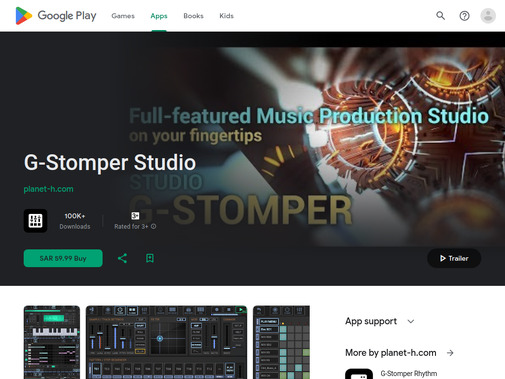
Variety is key when exploring Android DAWs, and G-Stomper Studio offers a unique approach that combines sequencing, sampling, and synthesis in one integrated environment.
Key Features:
- 24 slot VA-Beast virtual analog synthesizer
- Drum sampler with 24 pads
- 128-track step sequencer
- Real-time effects processor
- MIDI controller support
The unusual usage of a pattern-based workflow combined with traditional multitrack recording makes G-Stomper particularly appealing for electronic music producers who want flexibility.
n-Track Studio
With the right approach, n-Track Studio can serve as your complete Android recording solution. This DAW has been around since the desktop era and brings that experience to mobile platforms.
Key Features:
- Unlimited audio and MIDI tracks
- Built-in effects and instruments
- Live input monitoring
- EQ, compression, and reverb included
- Cloud collaboration features
While you’re at it, consider that n-Track Studio offers a free version with limitations, allowing you to test the workflow before committing to the full purchase.
Choosing the Right Mobile DAW
The main point is that your choice depends on several factors: your operating system, budget, experience level, and intended use case.
Consider These Questions:
1. Budget: Are you willing to invest in professional tools, or do you need free/affordable options?
2. Purpose: Will you use your mobile DAW as an idea pad or for full production?
3. Experience: Are you a beginner needing intuitive interfaces, or an experienced producer wanting advanced features?
4. Genre: Does your music style require specific instruments or production techniques?
5. Workflow: Do you need desktop integration, or will you work exclusively on mobile?
It’s tempting to download every DAW available, but it’s far better to master one that fits your needs than to constantly switch between apps.
Tips for Mobile Music Production
Screen Real Estate Matters
I’ve noticed that, since DAWs have so many options and buttons to play around with, it’s best to use a larger screen for music projects.
This makes it easier to get a larger picture of what you’re working on and which interface buttons to click.
If you’re serious about mobile production, investing in an iPad or Android tablet rather than working solely on a smartphone can dramatically improve your workflow.
Accessories Make the Difference
Make sure to consider these essential accessories:
- External audio interface: For professional recording quality
- MIDI controller: Physical keys and pads improve playability
- Stylus: Precision editing becomes much easier
- Headphones: Critical for mixing and monitoring
- Cloud storage: Protect your projects from device loss
Desktop Integration Strategy
Another issue is considering whether you use your mobile DAW as an idea pad or full-blown production environment. If it’s for ideas, you can then move the project to a desktop DAW for processing and final mixing.
Many professional producers use this hybrid approach, capturing inspiration on mobile and refining on desktop.
The beauty of apps like FL Studio Mobile, Cubasis, and GarageBand is their seamless desktop integration.
Projects started on your phone during a commute can be finished in your home studio the same evening.
The Future of Mobile Production
These mobile DAWs are great for on-the-go music production and idea generation. With so many updates and even more apps cropping up, mobile music-making will take on a bigger stage.
It has never been easier for aspiring producers to create professional-quality music without expensive studio equipment.
The barrier to entry continues to drop as mobile processing power increases and developers optimize their software for touch interfaces.
We hear from a lot of people who are trying to decide between investing in desktop software or starting with mobile production.
The answer isn’t either/or, it’s both. Mobile DAWs complement desktop setups beautifully, each serving different purposes in your creative workflow.
Final Thoughts
Bottom line, the best mobile DAW is the one you’ll actually use. Whether you’re recording song ideas during your lunch break, producing complete tracks on an iPad, or sketching arrangements on your Android phone, there’s never been a better time to explore mobile music production.
For iOS users, GarageBand offers an excellent free starting point, while Cubasis 3 and Auria Pro provide professional-level capabilities.
Android users should seriously consider FL Studio Mobile for its cross-platform flexibility and feature completeness, while Audio Evolution and G-Stomper Studio offer solid alternatives.
A great way to start is by downloading a free or trial version, importing some audio, and experimenting with the interface. You’ll quickly discover whether a particular DAW matches your workflow and creative style.
Thanks to a plethora of powerful mobile DAWs now available, the future of music production fits in your pocket. The only question that remains is: which app will you choose to bring your musical ideas to life?
Frequently Asked Questions
What are the best DAWs for mobile?
GarageBand, Cubasis, FL Studio Mobile, and BandLab are the most reliable mobile DAWs right now.
Are there any good DAWs for mobile in 2026?
Yes. Mobile DAWs in 2026 are powerful enough for beat making, recording, and full song demos.
What is the easiest mobile DAW to use?
GarageBand is the easiest to learn thanks to its clean layout and built-in instruments.
What are the best mobile DAWs to make beats?
FL Studio Mobile and Caustic are popular for beat making and electronic music.
Can mobile DAWs replace desktop DAWs?
No. Mobile DAWs work best for ideas and demos, not full-scale professional mixing.