
FL Studio 26 (also called FL Studio 2026) is Image-Line’s latest update, built to cut the friction that slows down a home studio session: hunting for sounds, losing unsaved work, stalling on a blank project.
This guide covers the 7 updates that actually save time, for home producers, beat makers, and solo creators who want faster results without switching DAWs.
Key Takeaways
- FL Studio 26 is a workflow update, not a sound-design overhaul.
- FLEX speeds up sound selection with a rebuilt engine and browser.
- Cloud backup protects sessions from lost or corrupted projects.
- Chord tools speed up melody and harmony writing.
- Gopher reduces troubleshooting time inside the DAW.
- Existing license holders get the update free through Lifetime Free Updates.
FL Studio 26 vs FL Studio 25: What’s New?
FL Studio 26 is a workflow-focused update, while FL Studio 25 was a smaller maintenance release. The biggest differences are a full rebuild of FLEX (its first since 2019), automatic FL Cloud project backup, the new Transmitter plugin, Audio Logger, and a more capable Gopher assistant that can now perform tasks rather than just answer questions.
If you were happy with FL Studio 25’s core workflow, FL Studio 26 keeps everything familiar and adds speed rather than changing how the DAW works.
How Do I Update to FL Studio 26?
Existing license holders update for free through Image-Line’s Lifetime Free Updates policy, either from inside FL Studio or by downloading the new installer from your Image-Line account.
Back up your current projects first, then download the FL Studio 26 installer, run it, and open a couple of older projects afterward to check that your key plugins still load correctly.
If you use FL Studio for paid client work, finish or export active projects before installing, since major updates can occasionally shift plugin behavior.
Do I Need FL Cloud to Use the New Features?
No, most of FL Studio 26’s new features work without a paid FL Cloud plan, but a couple are tied to it.
The rebuilt FLEX, Transmitter, chord tools, Audio Logger, and Channel Rack and Playlist updates all work on a free account.
The bigger Loop Starter library and larger cloud storage (5 GB on Plus, 1 TB on Pro, versus 500 MB free) require an FL Cloud subscription, so check your plan before assuming every feature in this article is included at no extra cost.
Should I Back Up My Projects Before Updating?
Yes, back up your projects before installing any major FL Studio update, including FL Studio 26. Save local copies of active sessions, especially client work, since a new version can occasionally change how a plugin loads or behaves.
I’ve noticed that this is separate from turning on FL Cloud backup afterward: one protects you before the update, the other protects you going forward.
What Is the Remix a Song Tool?
Remix a Song is a one-click tool in the Welcome window that detects a track’s tempo, sets your project BPM to match, and separates it into stems on the Playlist.
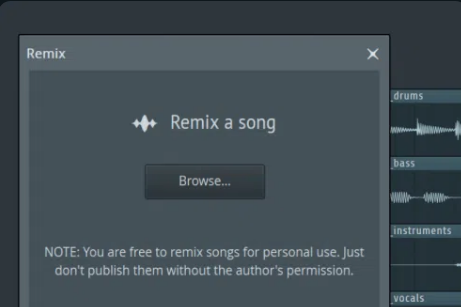
It is built for practicing remixes, studying arrangements, and creating personal edits, not for releasing commercial remixes without permission from the rights holder.
Once the stems are separated, you can mute, chop, and rearrange them like any other audio clip.
What Is Audio Logger in FL Studio 26?
Audio Logger continuously records the last 60 seconds of your Master output, so if you play or improvise a good idea without hitting record, you can recover it instead of losing it.
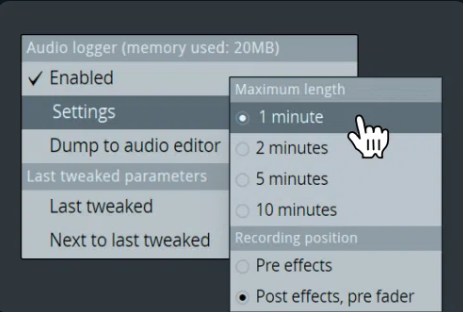
It runs quietly in the background while you work and needs no setup once it’s enabled. This is especially useful for producers who jam on a MIDI keyboard or test sounds without always remembering to arm a track first.
What Are the New Audio Clip Gain Controls?
FL Studio 26 lets you adjust gain, pan, and normalization directly on audio clips in the Playlist, without opening a separate plugin.
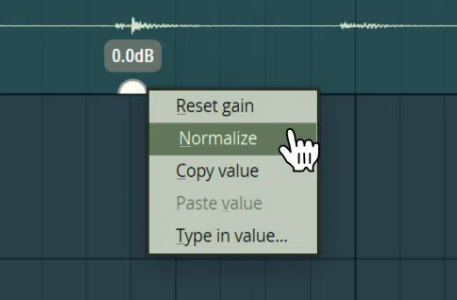
You can right-click a clip’s gain handle and normalize it individually or relative to the loudest clip in a selection, which speeds up leveling vocals, samples, and stems before they hit the Mixer.
This matters most for producers working with recorded audio rather than MIDI, since inconsistent clip levels make every compressor and effect downstream behave unpredictably.
Does FL Studio 26 Work With My Existing Plugins?
Yes, FL Studio 26 keeps compatibility with your existing VST and AU plugins, and the update includes a faster, safer plugin manager to reduce rescan issues after installing.
Image-Line recommends testing your most-used plugins in an old project after updating, since occasional third-party plugin updates (not FL Studio itself) can cause conflicts.
If something breaks, reverting to a previous FL Studio version is possible through your Image-Line account.
Is FL Studio 26 Available on Mac?
Yes, FL Studio 26 runs on macOS 10.15.7 or later, on both Intel and Apple Silicon Macs.
Image-Line recommends a quad-core CPU, 8 to 16 GB of RAM, and an SSD for smooth performance, and the update includes specific improvements to Apple Silicon audio handling to reduce dropouts. Windows on ARM is not supported.
How Much Does FL Studio 26 Cost for New Users?
New users can buy FL Studio 26 across 4 editions: Fruity Edition, Producer Edition, Signature Bundle, and All Plugins Edition, with price and plugin count increasing at each tier.
Every edition includes the core Channel Rack, Playlist, Piano Roll, and Mixer, so the difference between tiers comes down to which bundled plugins and sound packs you get.
All editions include Image-Line’s Lifetime Free Updates, meaning this is the only purchase required to get every future FL Studio version.
FL Studio 26 vs FL Studio 2026: Same Update
FL Studio 26 and FL Studio 2026 are the same release. Image-Line uses both names in its own marketing, so you will see either one depending on where you read about it, and the naming does not change which features you get.
Existing license holders get it for free. New users can buy in through 4 editions, from Fruity to All Plugins.
The 7 Workflow-Speeding Features
1. Rebuilt FLEX Synth: Faster Sound Selection
FLEX got its first full rebuild since 2019, which matters most if you build tracks around presets rather than sound design from scratch. The new engine loads sound faster and cuts CPU use.
A redesigned browser adds genre-based filters, so you can search across every sound pack at once instead of digging through separate menus.
Sound selection eats more studio time than almost anything else. FL Studio 26 ships 8 new Core Series packs with over 200 presets, so you are less likely to spend 20 minutes hunting for a pad or bass that already exists in your library.
2. FL Cloud Backup: Never Lose a Session
If you work off one laptop with no formal backup routine, this is the update worth paying attention to. FL Studio 26 adds automatic cloud backup built into the save process, so ticking one option means every save also uploads an encrypted copy to FL Cloud.
Free accounts get 500 MB, FL Cloud Plus raises that to 5 GB, and Pro goes up to 1 TB. Image-Line states that stored projects stay private and are not used to train AI.
A dead hard drive no longer means a lost session.
3. Smarter Chord Tools for Faster Songwriting
The Piano Roll’s Chord Panel can now detect notes and chords as you play them, and it keeps suggestions in the key of your project.
The Chord Stamp Tool adds top-down and bottom-up voice-leading modes, so progressions move smoothly between chords instead of jumping around.
Both are useful if you can hear what sounds right but do not always know the chord name or the theory behind it, which is most producers writing by ear rather than from sheet music.
4. Loop Starter: Beat the Blank Session
FL Cloud subscribers now get a much bigger Loop Starter library, with more loops and one-shots organized by genre. Pick a genre, roll the dice, and you get a stack of sounds that already work together as a starting point.
It’s the fastest way in FL Studio 26 to beat a blank session. Treat the result as a sketch, not a finished beat.
Swap sounds, chop loops, and add your own MIDI once the idea is moving.
5. Channel Rack and Playlist: Built for Faster Arranging
FL Studio 26 brings across-the-board updates to the Channel Rack and Playlist, which matters most once you’re arranging full songs rather than short loops. Channels can now be sorted by type: samplers, instruments, automation clips, audio clips.
Audio clips also get direct gain, pan, and normalize controls without leaving the Playlist, so editing, copying, and leveling clips takes fewer trips back and forth between windows.
6. Transmitter: Independent Control Over Drums and Bass
Transmitter is a new plugin, included in the All Plugins Edition, that splits any signal into its transient and sustain parts. That means you can shape the crack of a snare and its tail independently, or tighten a kick’s attack without touching its low-end body.
Mix-focused producers working with drums, bass, and percussion get the most out of this. It replaces the 2 or 3 separate tools you’d normally reach for, folding that work into one plugin with its own routing.
7. Gopher: Less Time Troubleshooting
Gopher, FL Studio’s built-in assistant, now handles more than simple Q&A. It can organize tracks, route mixer channels, set levels, and adjust plugin parameters.
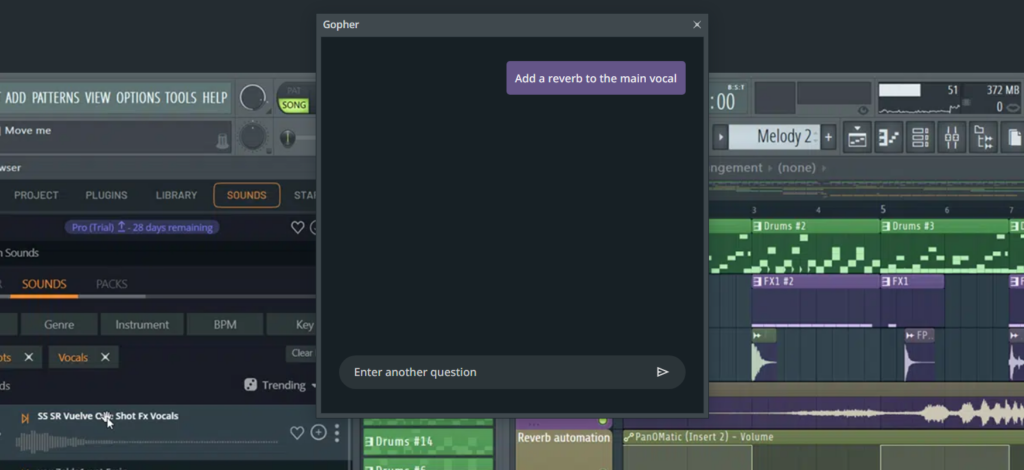
It can also generate Piano Roll or effects scripts on request, including in your own language, which helps if you’re self-taught and don’t have anyone to ask when something breaks.
Image-Line says Gopher does not train on user data and does not make creative decisions for you.
Why Does FL Stduio 26 Matter for Home Studios
Home studios run on limited time and smaller setups, often with one person handling writing, recording, mixing, and troubleshooting. Every minute spent searching for a sound or recovering a lost project is a minute not spent finishing a track.
FL Studio 26 is built around that reality. None of the 7 features above are flashy on their own, but together they cut the small delays that add up across a session, which matters more for a home producer than any single new plugin.
If you are updating today, start with backup, FLEX, and Loop Starter first. Those 3 changes give you the fastest payoff before you touch anything else.
Quick Getting-Started Checklist
- Install or update to FL Studio 26.
- Turn on FL Cloud backup in your save settings.
- Test a few FLEX presets from the new Core Series packs.
- Try the updated chord tools in the Piano Roll.
- Build a quick loop with Loop Starter.
- Shape a drum sound with Transmitter.
- Ask Gopher for help with one specific workflow problem.
FAQ
Is FL Studio 26 worth updating to for home producers?
Yes, for most existing users. It is a free update through Lifetime Free Updates, and the changes target real production slowdowns rather than adding features you will never use.
Do I need expensive gear to use FL Studio 26?
No. FL Studio 26 runs on the same minimum specs as recent versions: a 2 GHz CPU, 4 GB of RAM, and 4 GB of free disk space on Windows, or macOS 10.15.7 or later on Mac. A faster machine helps, but it is not required to use the new features.
Is FL Studio 26 free for existing users?
Yes. Anyone who already owns an FL Studio license gets FL Studio 26 at no extra cost through Image-Line’s Lifetime Free Updates policy.
Is FL Studio 26 good for beginners?
The chord detection tools, Loop Starter, and Gopher assistant all lower the barrier for producers who are still learning music theory or the software itself. A quick way to build confidence with keys is our interactive circle of fifths tool.
Will FL Studio 26 run on older computers?
It should, as long as your system meets the minimum requirements. The rebuilt FLEX engine actually uses less CPU than the previous version, which can help on older hardware.
Final Thoughts
For home producers, FL Studio 26 is mainly a speed and workflow upgrade, not a sound-altering one. It will not change your sound, but it will change how fast you get from idea to finished track.
The biggest wins for a home studio are the cloud backup, the rebuilt FLEX, and Loop Starter. Between them they cover the 3 things that stall a session most: lost work, slow sound selection, and staring at an empty project.
If you already own FL Studio, update, turn on cloud backup first, and spend one session testing the other 6 features before your next full track.